aalogic.com

DTC-100-V6 Supports HyGain/Yaesu/Orion/RT4500/Alpha SPID

The DTC-100 Version 6 is compatible with digital pulsed feedback rotators such as the Orion 2800, Alpha SPID, DCU-3, and RT4500HD from DX Engineering.

In addition to pulsed feedback sensors, the DTC V6 supports resistive sensors found in Yaesu lineup of G450/G800/G1000/G2800 rotators as well as all HyGain models.

Another feature included in V6 is the ability to set Soft Rotational Limits for Yaesu and HyGain models incorporating fixed mechanical limit. 

Feature List Includes:

  • Computer Interface for Logging Programs
  • Computerized Motor Control
  • Auto Brake Release/Engage
  • Speed ramp Up/Dwn for smooth Start/Stop
  • Variable Coast Control
  • Pinpoint Accuracy
  • Automated calibration for simple installation
  • Supports Pulsed Feedback Sensors
  • User ability to set Soft Limits

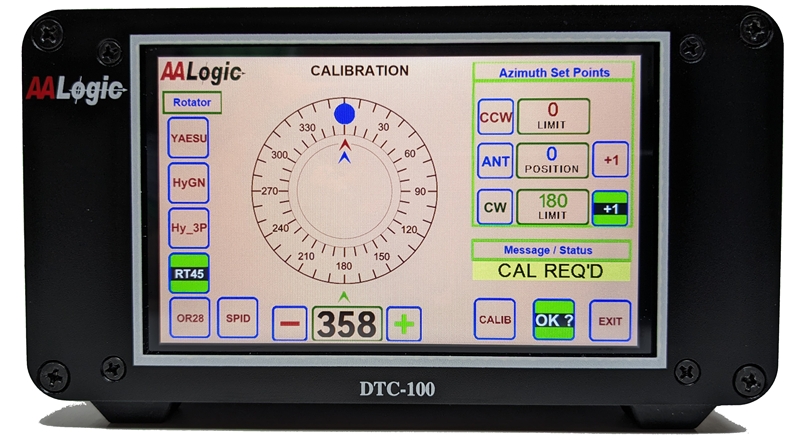
Primary difference between the DTC V5 and V6 is found on the Calibration “CAL” screen. Version 6 expands the selection of supported rotator types while still offering full support for resistive feedback sensors such as those used by Yaesu and most HyGain models.

While imperative for pulse models without “Hard Limit” switches, V6 adds the ability for rotators with limit switches to set additional rotational limits through software control.


Once rotator type has been selected, the user is guided through the setup process.

Antenna position, CW SoftLimit, and CCW SoftLimits are entered by pressing the “Blue Dot” area of the screen, then fine adjusting with (+/-) buttons.  Arrows around the compass allow a visual indicator to the rotational limits set by the user.

Rotators without hard limit switches are allowed to travel up to 540 degrees from any setpoint chosen by the user.

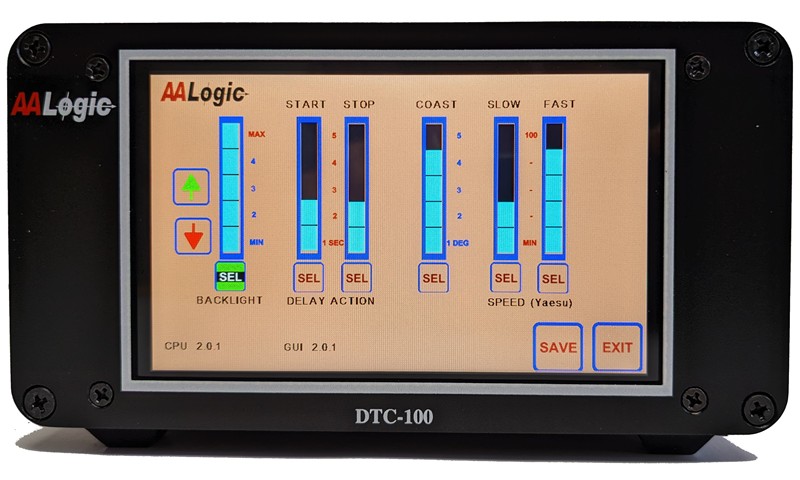
Function such as backlight intensity, start/stop brake function needed on HyGain rotators, coast, and ramp UP/DWN are programmed by the user on the “CFG” configuration screen.

For rotators without specific brake interfaces, the Start/Stop delay functions are used to set ramp Up/Dwn timing.  

Coast control removes power from the rotator prior to reaching the azimuth destination whereby compensating for any slight overshoot.

Motor speed controls for DC motors set the Start,Run and Slow down of the antenna movement, helping to minimize sudden stress on rotator and antenna. 

Pressing the “NEXT” button on the “CFG” configuration screen allows the user to set Intensity/Time for screen saver mode.  

The user can select any intensity from full brightness to black, and the time inteval from last button press to entering saver mode.   If desired the user can bypass the saver mode by setting of ZERO on the timer.

A touch circle is used as an entry tool to set user selectable memory locations. The (+/-) buttons can be used to provide pinpoint accuracy. Pressing SAVE button stores set values in memory. The user has the option of setting a single azimuth entry or all 6 locations before saving. Updating saved values can be easily done by pressing MEM button.

Memory Screen for Version 5 and Version 6 are identical.

Any update made on this screen is considered temporary until “SAVE” is pressed.   The save button will store memory values in Flash memory and reload on subsequent power cycles.  Temporary values will only be saved until power is removed.  

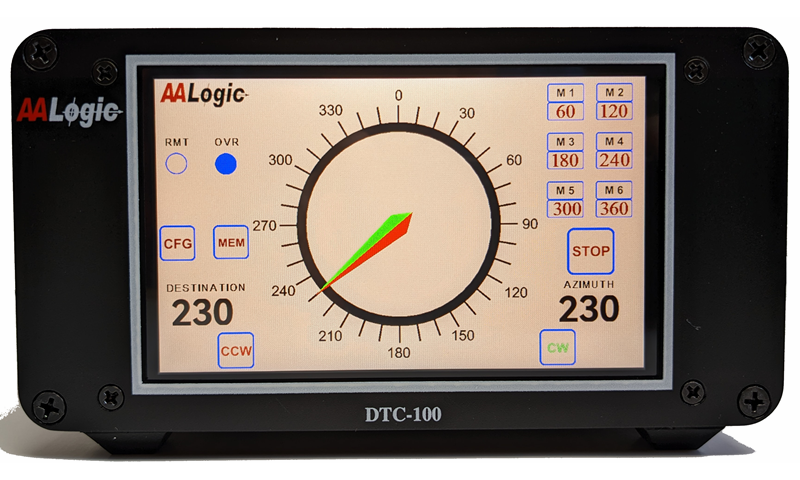
The main screen contains all the information needed for normal operations. Touching the outer portion of the circular dial initiates rotator action.

For rotators with more than 360 degrees rotation the DTC know to take the shortest path. Any azimuth beyond the 360 degrees is indicated by the blue “OVR” dot.

In addition to automatic touch and memory selection, the user has the ability to jog the CCW/CW direction by pressing and holding the associated manual buttons.

Like the memory screen,  V6 and V5 are identical.  This screen also allows a back door entry into the Calibration Screen by pressing CFG and then CAL on the configuration screen.